A voice-controlled home automation app
A 12-week concept for a voice-controlled smart home app — from surveys and interviews to a tested prototype.
- Role
- UX/UI Designer
- Responsibilities
- UX research, interviews, personas, empathy mapping, user journey, IA, wireframes, prototyping
- Time
- 12 weeks · London
- Tools
- Figma, Illustrator

About
Homi is a concept for voice-controlled home automation using the Internet of Things.
The goal was to study how existing home automation systems work, analyse their issues, and propose solutions. Home automation is growing fast — it supports older and physically disabled people, lets people monitor home while away, and can help with energy and cost savings, comfort, healthcare and security.


Design process
Four weeks of research, three defining pain points and goals, three designing and prototyping, and two testing and gathering feedback.
Weeks 1–4
Research
General research, online survey, user interviews, competitive analysis.
Weeks 5–7
Define
Personas, user flows, problems, design goals, storyboards.
Weeks 8–10
Ideate
Brainstorming, sketching, wireframing, prototyping.
Weeks 11–12
Validate
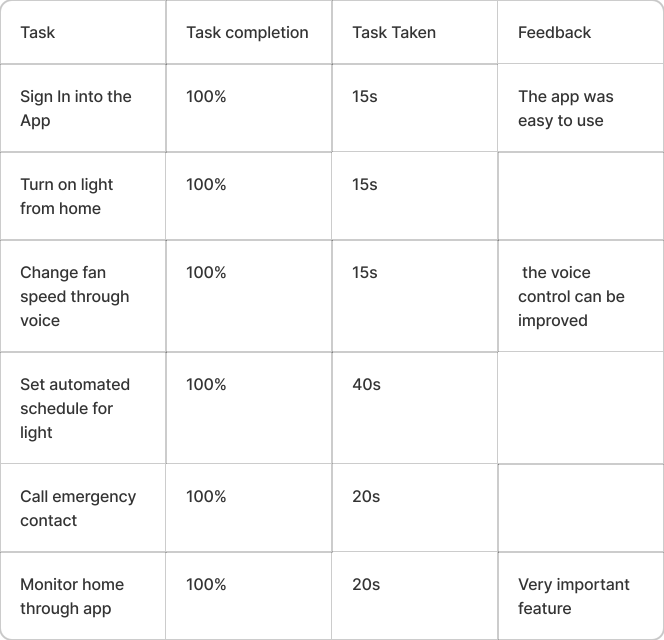
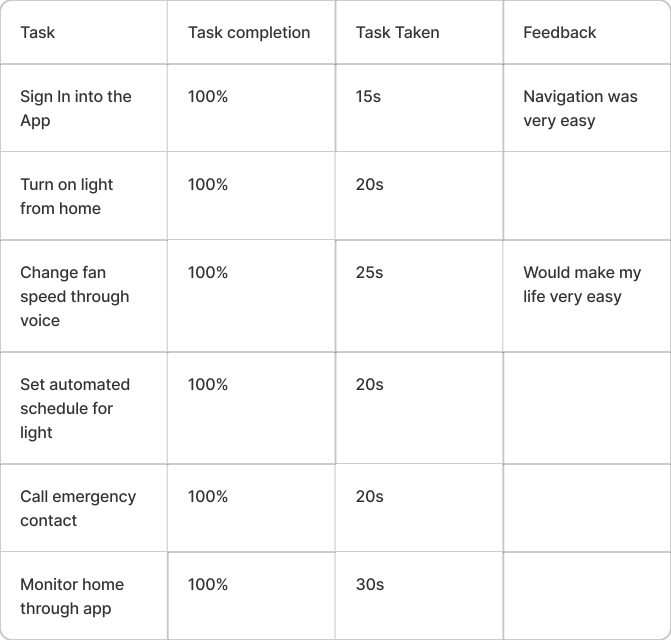
Gathering feedback, testing tasks.
Background
- Nikola Tesla’s remote-controlled boat
- 1898
- The digital computer
- 1940
- ECHO IV, the first home automation system
- 1966
- Smart House
- 1980
- Smart House & IoT
- 1990
Home automation helps with saving energy and money, convenience, home security and security cameras.


Existing products
Direct
Amazon Alexa, Google Home, Alfred Camera
Indirect
Spotify, Uber
Replacement
Zenbo Robot
Competitor analysis looked at the most successful products, their distinctive features, purpose, strengths and limitations, and audiences — to understand the market, where existing features fail, and how to attract people with new, easy-to-use features.

Common issues
Privacy · Access to only a few products · Data leaks · Can’t connect to Wi‑Fi · Doesn’t respond to voice
User survey
A survey gathered basic details and people’s knowledge of home automation. 50 responses.


SWOT & objectives
Using the competitor analysis, a SWOT analysis narrowed down what to consider when planning the services.

- Let people use voice input
- Connect all necessary home devices to one app
- A simple, handy and elegant interface
- Improve trust and security
- Monitor home from anywhere
Interviews & personas
- Have you used automation systems before?
- Describe a time you needed it most.
- How often do you use them?
- Have you faced any issues? What needs to improve?
- What other features would you like?
The interviews shaped personas — realistic representations of the key audience segments.


Affinity mapping

Journey mapping
User flow & wireframes
The user flow shows how people move through the final screens. Paper prototypes were tested before moving to low- and mid-fidelity wireframes.


Paper prototype

Low fidelity

Low fidelity

Low fidelity

Login

Living room

Fan

Schedule

Emergency

Scenes

Home
Logo & visual design

Colour & typography

Logo sketches

Logo
Final designs


Challenges & discussion
Because of the pandemic, some of the target audience couldn’t take part in interviews and testing. Prototyping some animations — like the microphone recording voice — was hard within Figma’s limits.
Overall the project met its aims and objectives, and participants completed the test tasks successfully.
Next case study
Illustrations & interactions